I redesigned a core contractor assessment flow, taking it from a cluttered tabbed form to a focused, one-question-at-a-time experience. Completion rates went from around 70% to over 90%.
Overview
Highwire is a construction SaaS platform used by large clients like Google, Intel, and Harvard to manage risk on multimillion-dollar projects. One of Highwire's core services is vetting contractors through detailed "assessments." Clients can invite hundreds of contractors at a time, and each one has to submit safety and compliance information through our system.
These assessments are the primary interface contractors interact with, and they weren't being completed.
Role
UX Designer
Team
PM, Design, and Stakeholders
Timeline
3 months
1. The Problem
The assessment experience used a tabbed navigation layout. Each tab held 20-30 questions in a long scrollable form, and a typical assessment could have around 50 questions total. Fields were buried in subtabs, making them easy to miss.
The result: our completion rate sat at about 70%. Support was getting frequent calls from contractors asking, "What am I missing?" Incomplete submissions meant clients weren't getting the data they needed, and our internal team was spending time chasing contractors to finish.
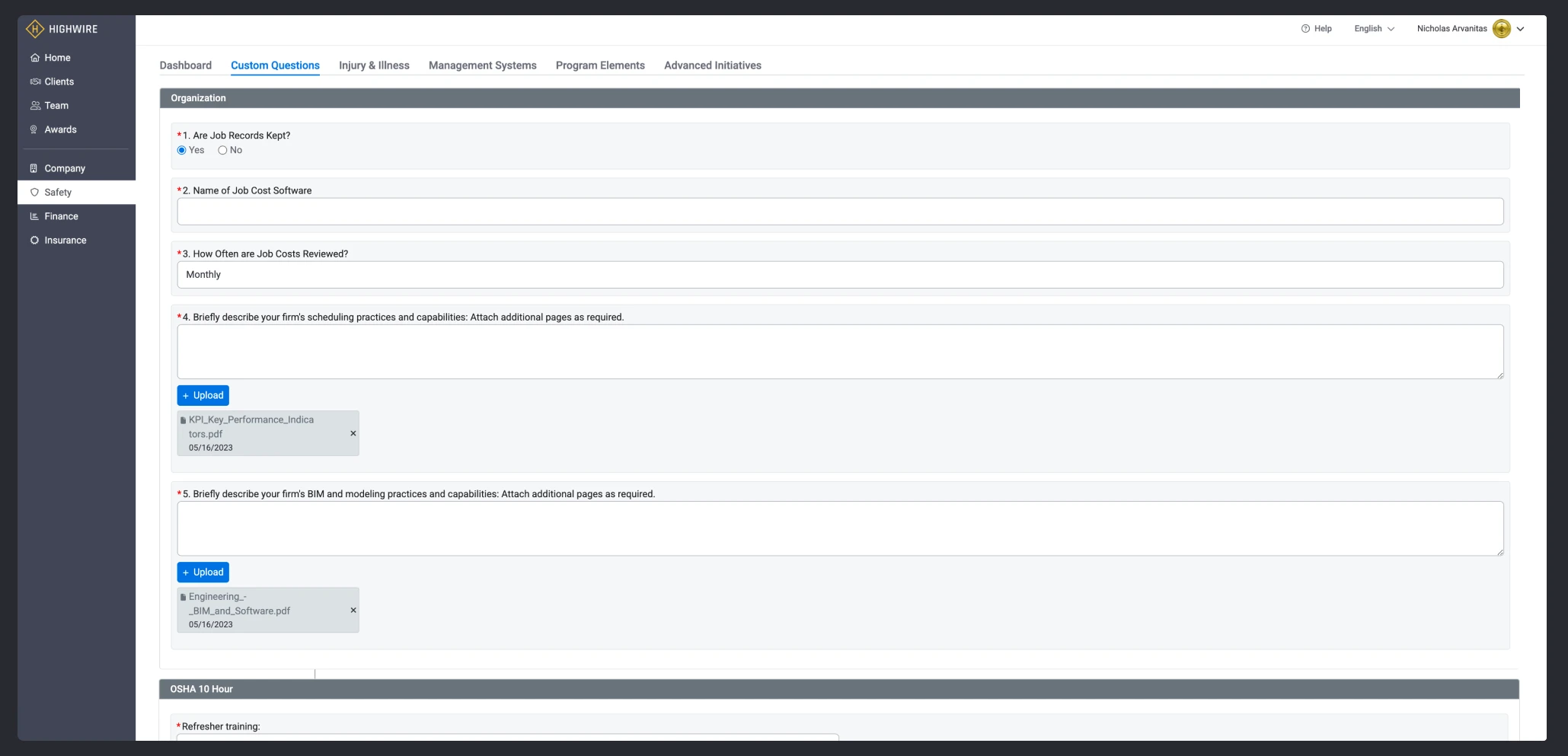
Each tab had 20-30 questions. Missing fields were easily overlooked in the scroll.
2. Research & Discovery
We gathered feedback primarily through our PM who was hearing from contractors and internal teams. Contractors were getting lost in long scrollable forms, missing questions buried further down the page, and then not being able to find them again.
We looked at how other products handle long, multi-step forms. TurboTax was a big reference point for us: one question at a time, clear progress, no scrolling through walls of fields. The simplicity of that pattern felt like the right direction.
Why not just improve the tabs?
The existing tab layout had a fundamental scaling problem. With 50+ questions spread across a few tabs, you'd end up scrolling through pages of fields and losing track of where you were. We considered keeping tabs and improving them, but the core issue was that the format just didn't work for long, complex assessments.
A unique challenge: evergreen data
One thing that made this harder than a typical assessment is that our data isn't point-in-time. In most assessment systems, you fill out a form, submit it, and it's locked. Our data was different. A contractor's safety certifications, insurance info, and financial details can all change at any time. There was no real "submit" button because collecting and maintaining this data is the entire product.
This meant we couldn't treat the experience like a one-time survey. We had to design something that worked for both initial completion and ongoing updates.
3. Goals
Complex to Simple
One question at a time with a clear, linear flow
Static to Dynamic
Questions injected based on prior answers
Confusing to Clear
Contractors should always know what's required and what's missing
4. Design
Entry Point
We started with a single "Complete Assessments" button on the contractor homepage, with visual indicators showing completion status and any awards earned.
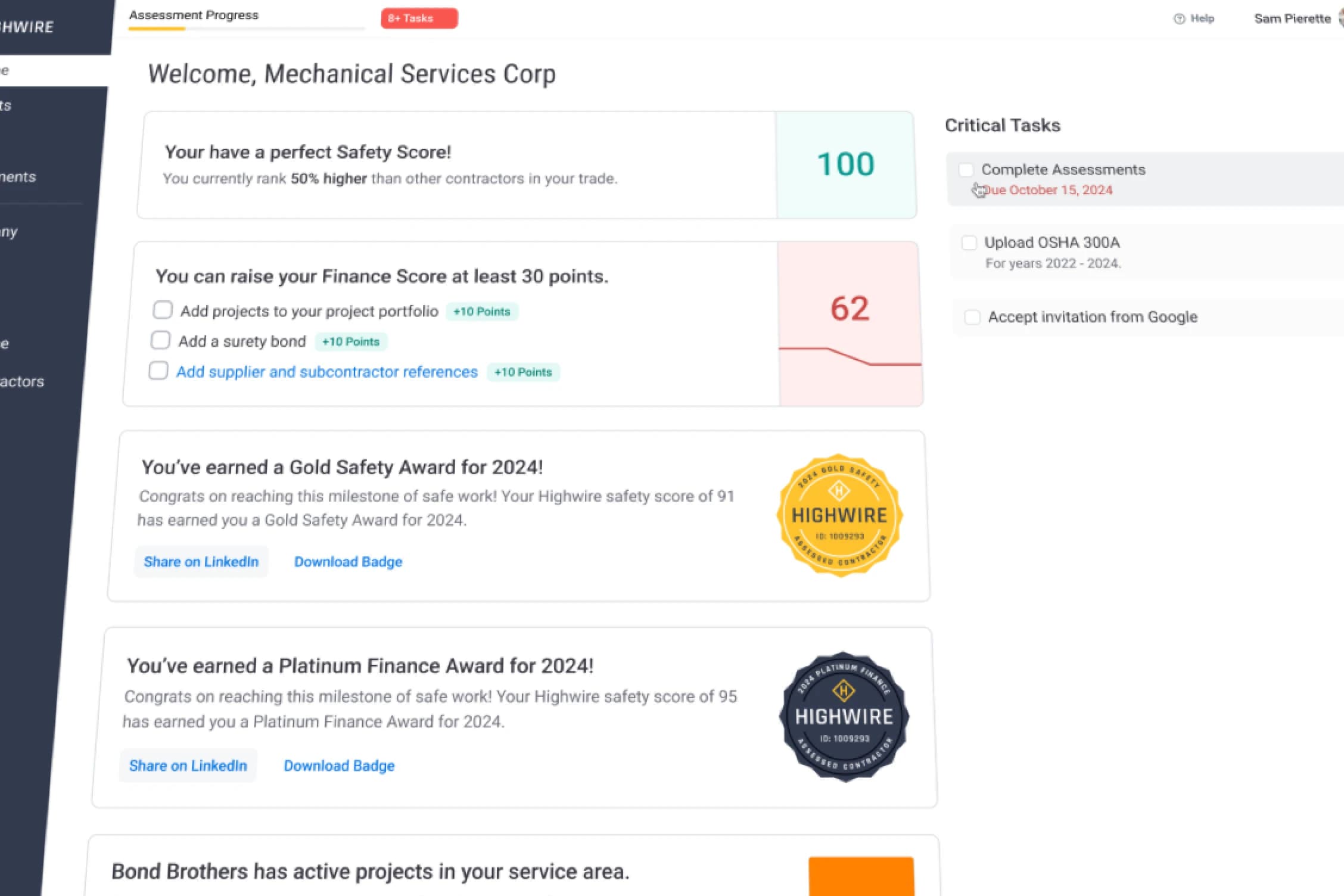
One clear entry point. No guessing about where to start.
One Question Per Panel
The core of the redesign was moving from scrollable tabs to a focused, one-question-per-panel layout. Each screen shows a single question with clear context and input.
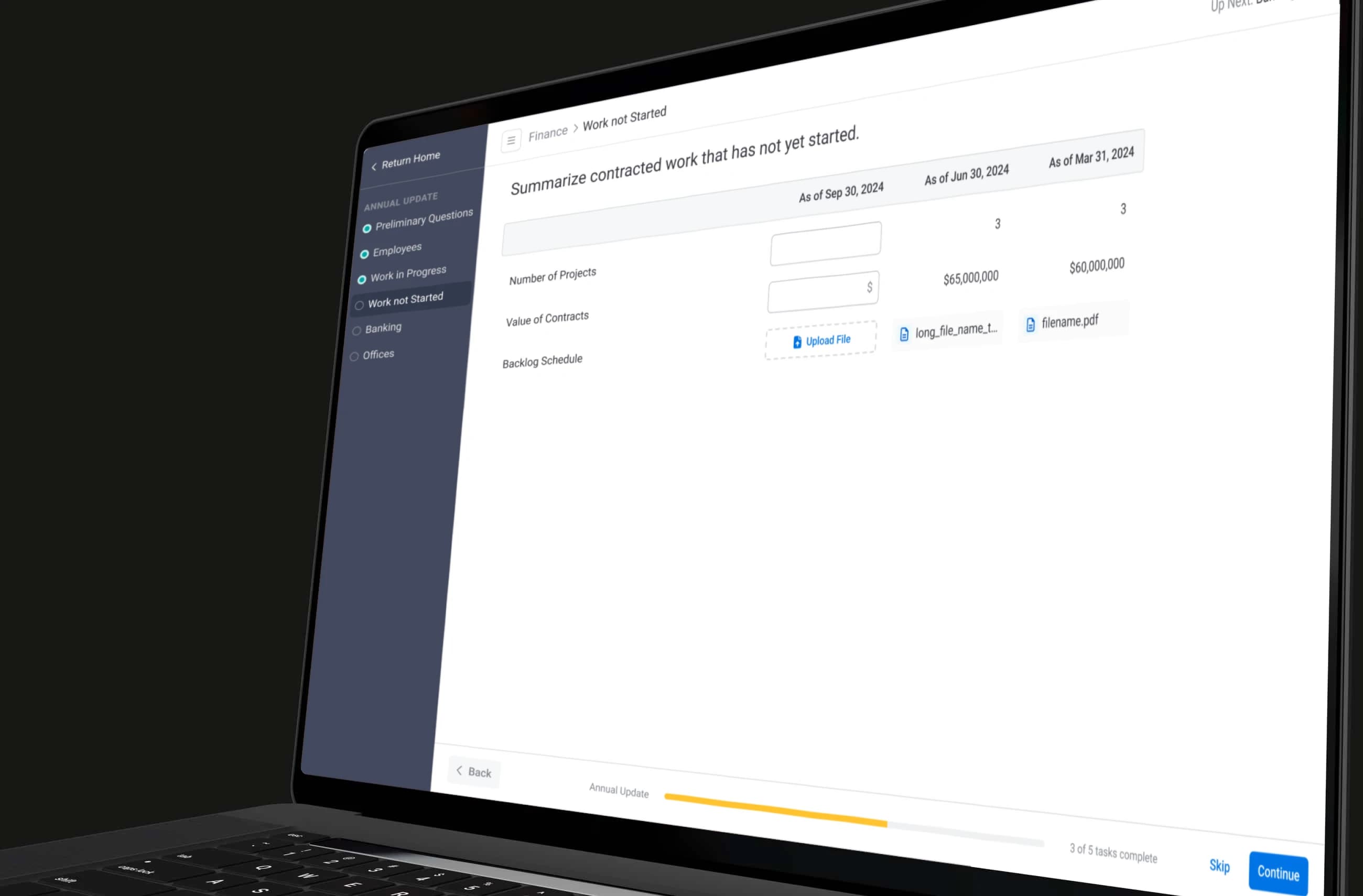
Inspired by TurboTax: one thing at a time, less cognitive load.
We grouped questions by topic (company info, safety, finance) and drew inspiration from e-learning platforms where you move through modules in sequence.
There was a trade-off with the previous tabbed design that led us here. With tabs, we could point a contractor to a specific tab if something was missing. But if they were incomplete on a few questions within a tab, they might never notice, or they'd have to scroll through the entire form to find them. For example, if you were taking the finance assessment and were incomplete on questions 1, 2, and 3, those are just three radio buttons that all appear on the same scrollable page, but you might scroll right past them. The new design made things more focused. We reduced all the tabs that were already complete and built a new left nav that focused only on the items still pending.
Dynamic Question Injection
This was the feature that made the new flow really work. Based on a contractor's answers, new questions could be injected into the flow automatically.
For example, if a contractor indicated they do electrical work, we could configure more detailed questions to be added to their assessment. The questions scaled with the complexity and risk of the contractor's work.
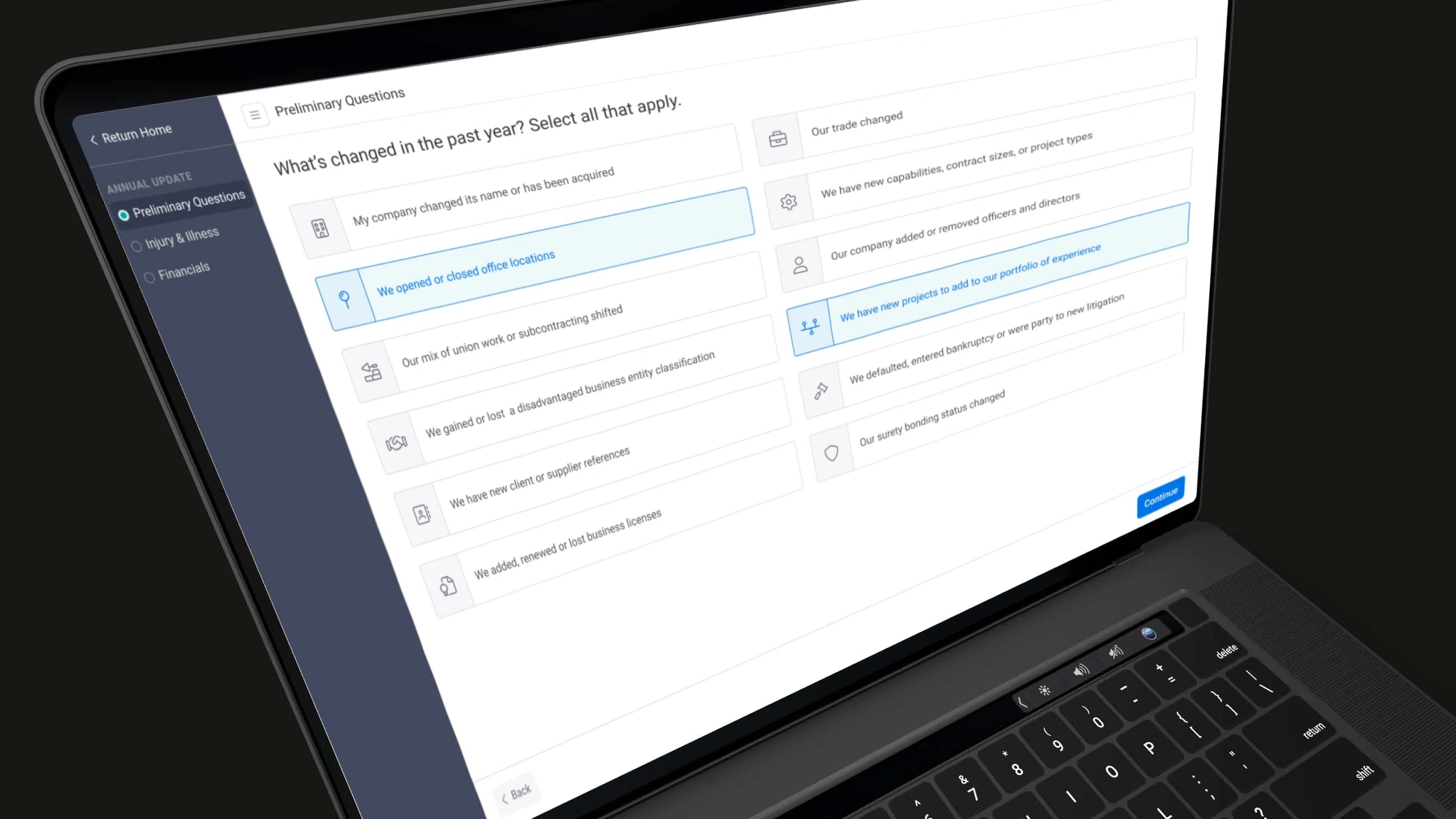
Answers drive what comes next. No unnecessary questions, and higher-risk contractors get the scrutiny they need.
Progress and Chunking
To keep contractors motivated through 50+ questions, we added progress bars and broke the experience into digestible sections. The idea was borrowed from e-learning: group questions by topic (company info, safety, finance) and let people see how far along they are.
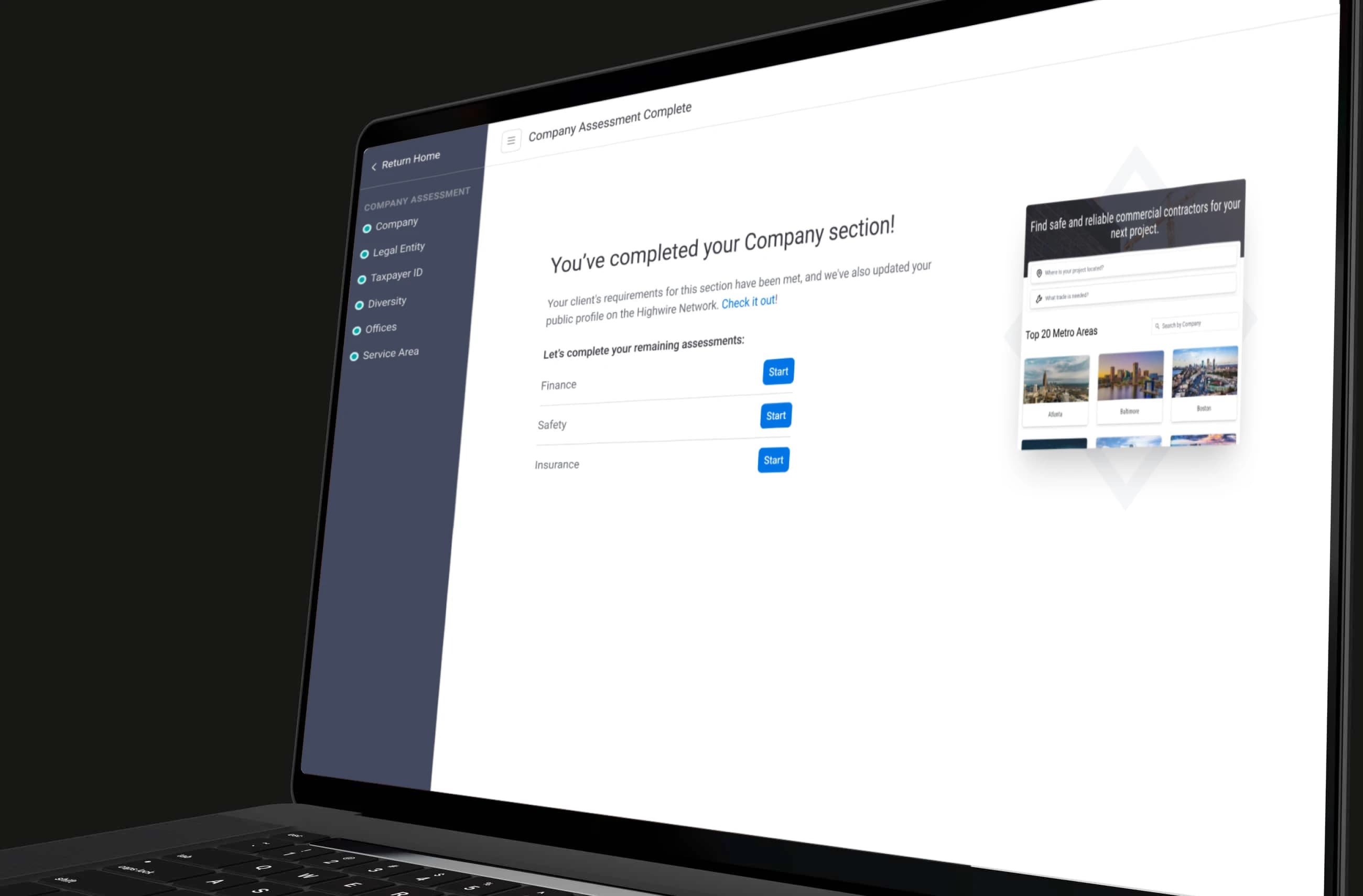
A persistent progress bar gives contractors a sense of how much is left, reducing the feeling of an endless form.
Each section had its own completion state, so contractors could see at a glance which areas were done and which still needed attention.
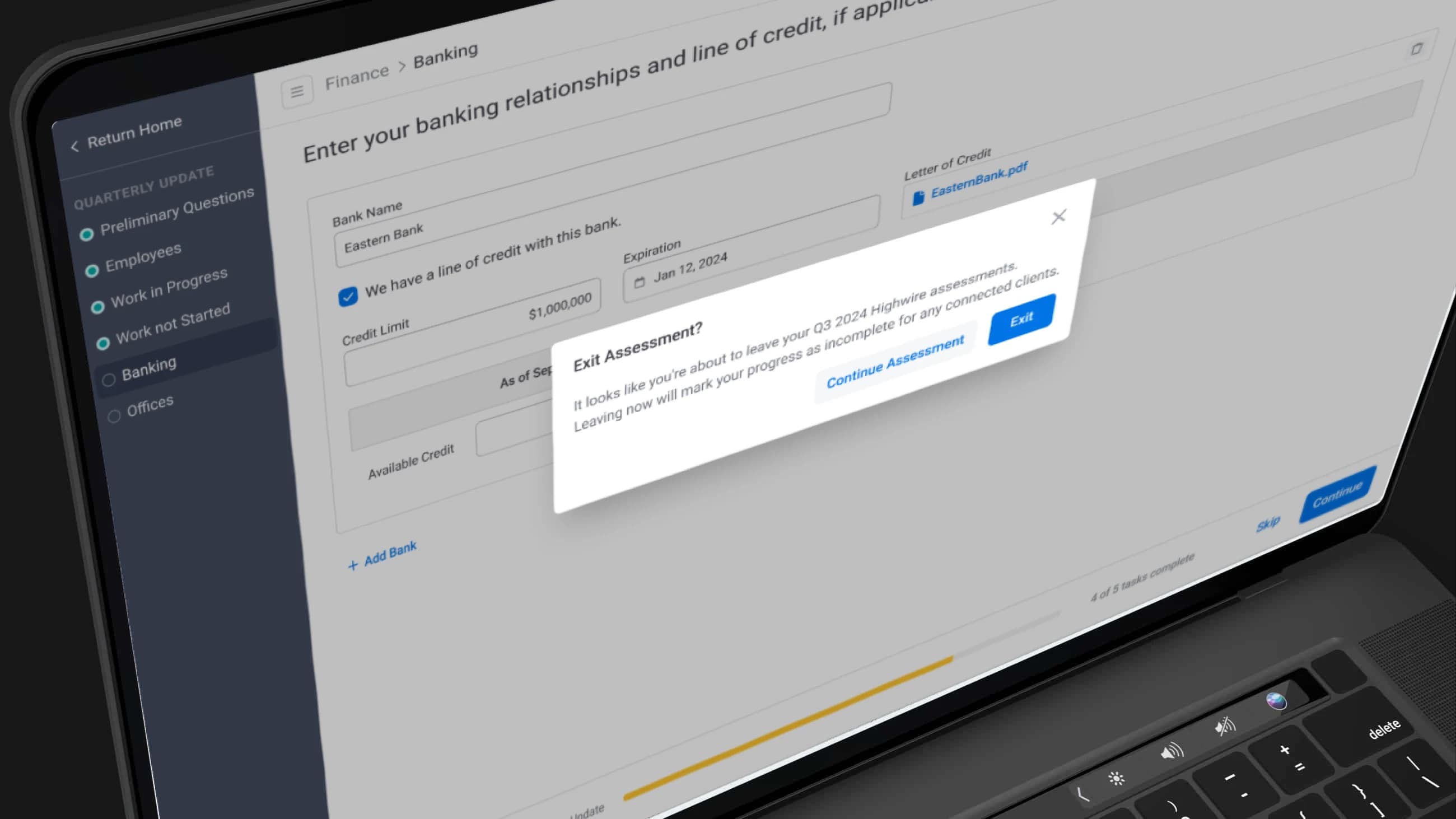
Visual completion indicators for each group. No more guessing about what's finished.
Within each section, questions were laid out in a clear sequence with consistent formatting, making it easy to move through them without losing context.
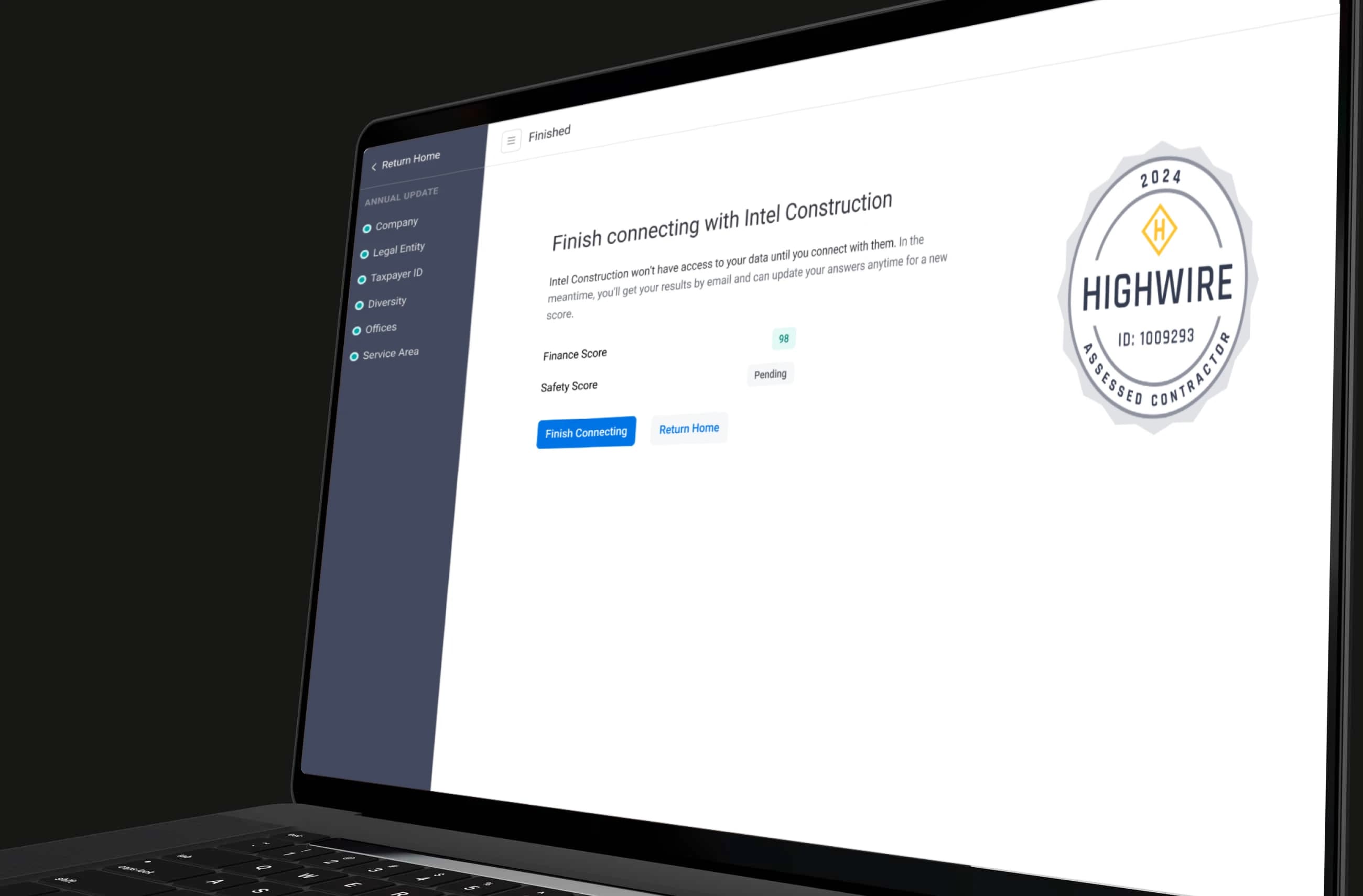
Breaking 50+ questions into clear groups made the whole thing feel manageable.
Upsell Opportunities
While redesigning the flow, we identified natural points to surface prompts for contractors to connect with additional clients, creating a revenue opportunity that didn't exist in the old tab-based experience.
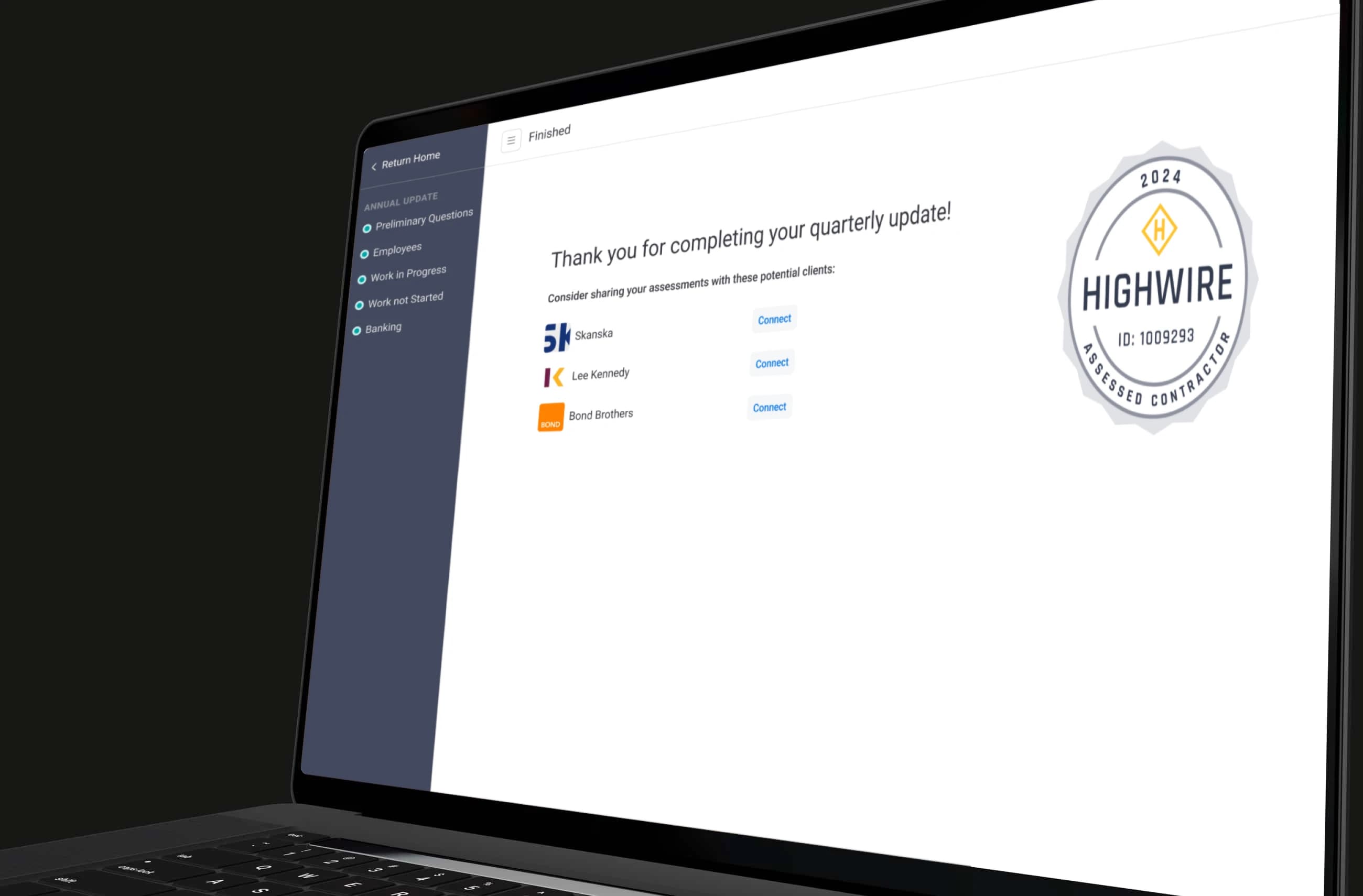
Contextual prompts placed at logical points in the flow, not interrupting the assessment itself.
Admin Configuration
Internal team members (account managers and PMs) needed a way to set up and configure the logic for each client's assessments. We designed an admin interface that was flexible enough to support different configurations without becoming so configurable that it was hard to maintain.
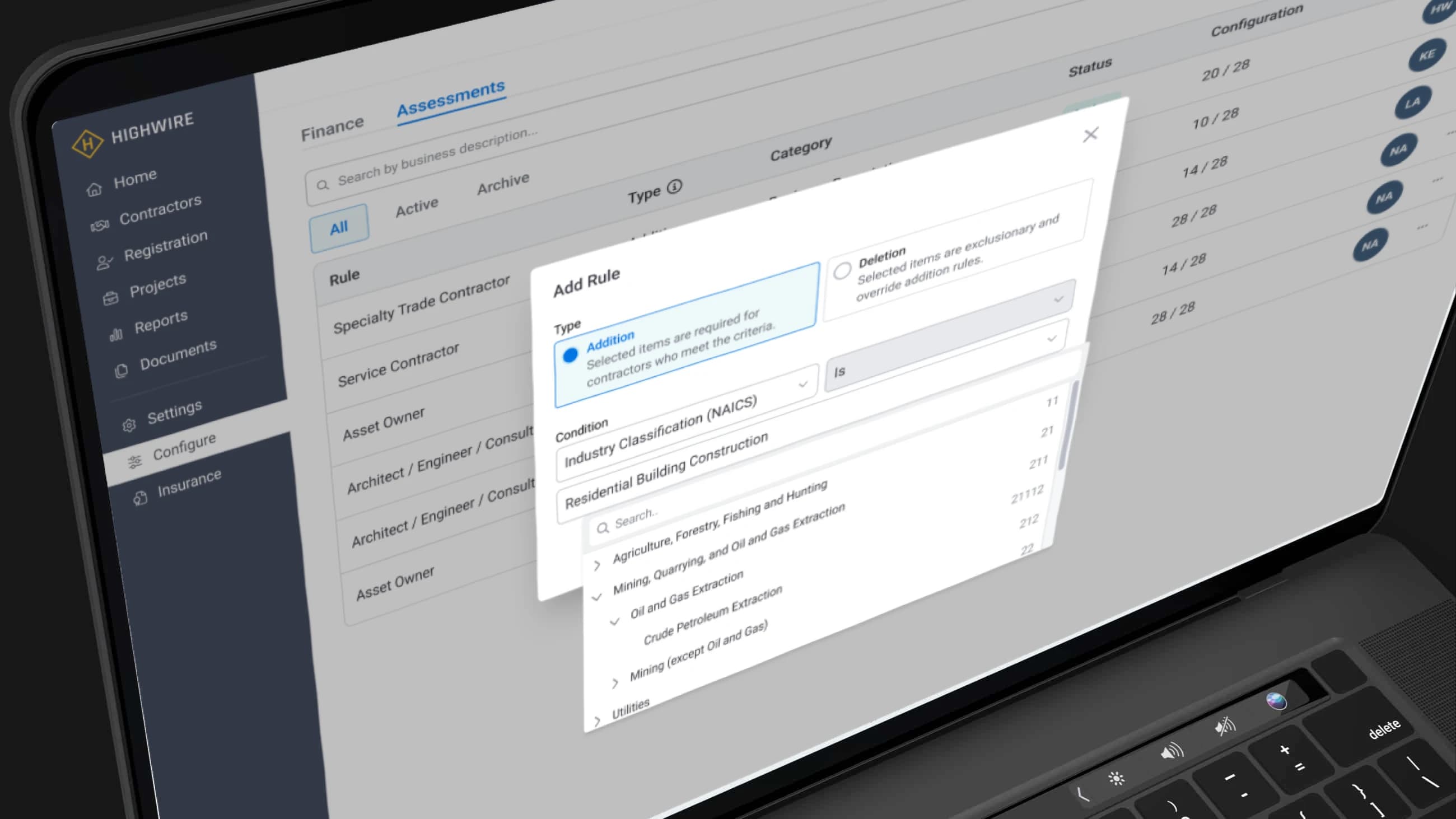
Keeping the admin side simple was just as important as the contractor side.
5. From Prototype to Launch
The design went through about three major iterations in Figma. Early on, we explored a large modal-based approach before landing on the full-page panel flow.
The biggest scope challenge was how much logic to bake in. We initially planned for multiple entry points and heavy configurability, but pulled back when it became clear that too many options would make the system hard to maintain. Keeping it simple was a deliberate choice.
Throughout development, I stayed involved in design QA, reviewing PRs and catching issues with padding, component usage, and making sure the grouping and hierarchy matched the designs.
Outcomes
- Launched a simpler, more focused contractor assessment experience
- Completion rates improved from roughly 70% to over 90%
- Reduced support burden around "missing fields" confusion
- More completed assessments meant less time for internal teams chasing contractors
- In production for about a year
Takeaways
- Simplification pays off. Flattening a complex tabbed form into a linear flow drastically improved usability and completion.
- Design for the trade-offs. The old tabbed layout made it easy to miss things in a long scroll. The new focused layout solved that but added more clicking. Understanding that trade-off early helped us design around it.
- Not every assessment is a test. Designing for evergreen, always-changing data required a different mindset than a typical "fill out and submit" form.
- Scope discipline matters. We could have made the system endlessly configurable. Pulling back on that kept the product maintainable and shippable.
- Stay close to dev. Being involved in QA during implementation kept the final product true to the design intent.