Highwire's front end stacked Bootstrap, Tailwind, PrimeNG, and custom CSS, and their styles clashed, so the same button or table looked different from page to page. I fixed the load order and removed 120 CSS files and 5,000+ lines of global CSS. The biggest change, in June 2024, updated about 80% of component files. On that base I themed PrimeNG and built the custom components, and the system was rolled out across three apps.
Role
UX/UI Designer, then UX Engineer. Owned the system in code and designed some components.
Team
1 other designer, who shared the component design with me. ~30 engineers, mostly Java.
Timeline
Aug 2023 to Oct 2025, alongside feature work. The big CSS change landed in June 2024.
The problem: Four styling layers stacked on each other
When I joined Highwire, the same button, card, or table could look different depending on which page you were on and who built it.
The app was built on Bootstrap. Over the years, Tailwind and custom CSS got layered on top, then PrimeNG components on top of that.
!importanteverywhere- Styles loaded in an unpredictable order, so fixing one page broke another
- Engineers rebuilt common patterns by hand, like a div with colored text in place of a pill
- "Global" components lived in different folders, and nobody knew what already existed
- 10–15 different table implementations doing roughly the same job
Most of our engineers were strongest in Java. Nobody owned the front end, so every feature added a little more drift.
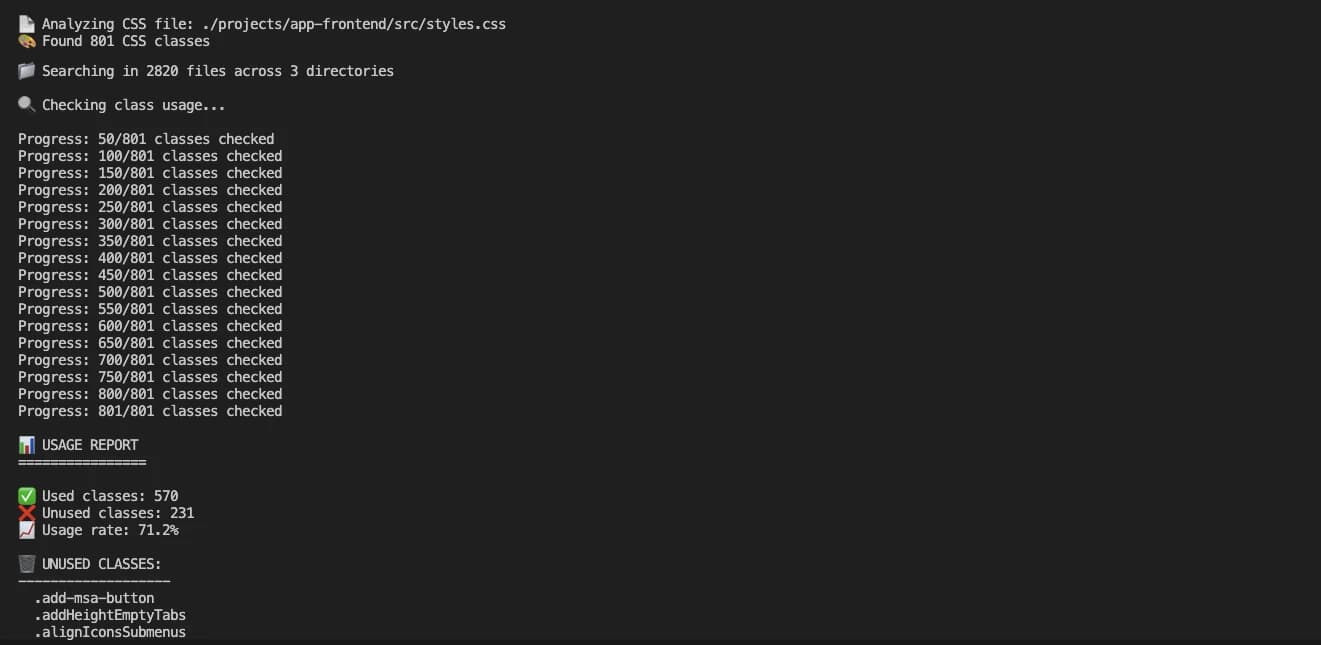
An audit script checked every class in our global stylesheet against 2,820 files. 231 of the 801 classes weren't used anywhere.
Tracing where styles came from showed the conflicts came from load order and overlapping frameworks.
The insight: a component library on its own wouldn't hold. As long as the base styles kept changing how it looked, engineers would keep patching around them.
The bet: Theme what we had, and keep only what we use
PrimeNG and Tailwind were already in the codebase when I arrived. Third-party developers had set them up, and nobody on the team maintained them. Angular doesn't have many component libraries to choose from, and replacing PrimeNG would have meant rebuilding our tables, date pickers, and dropdowns, so I themed it for those heavy components and built our own where it was quick. If a card or pill took an hour or two, I owned it. What I cared about most was cutting down variation. PrimeNG is built for every kind of product, and Highwire needed a small part of it, so the system only offered the options our product used. The cost is living with some PrimeNG behavior we wouldn't have designed. It's the same approach I took later at Veriforce, with a theme on MUI.
1. Fix the CSS foundation before the components
In CSS, when two styles conflict, the one that loads later usually wins. Before, six files loaded, and PrimeNG's default styles came last, so they won over our own theme and global styles.
"styles": [
  "bootstrap.min.css",
  "hw-theme.css",          // PrimeNG theme
  "styles.css",            // global styles
  "tailwind-styles.css",
  "fontawesome.css",
  "primeng.min.css",       // more PrimeNG, overriding everything above
],
In June 2024 I cut it to four files. Tailwind and our global styles load first as the base, Bootstrap is scoped, and our PrimeNG theme sits on top in a set order.
"styles": [
  "styles.css",            // Tailwind + globals at the base
  "bootstrap.scss",        // scoped
  "primeng.scss",          // our theme
  "fontawesome.css",
],
Then I cleared out what we didn't need: 120 CSS files and 5,000+ lines of global CSS. The final pull request touched over 100,000 lines and about 80% of the component files, mostly to convert their CSS.
I also wrote a styling guide for engineers, so new code wouldn't add global overrides back.
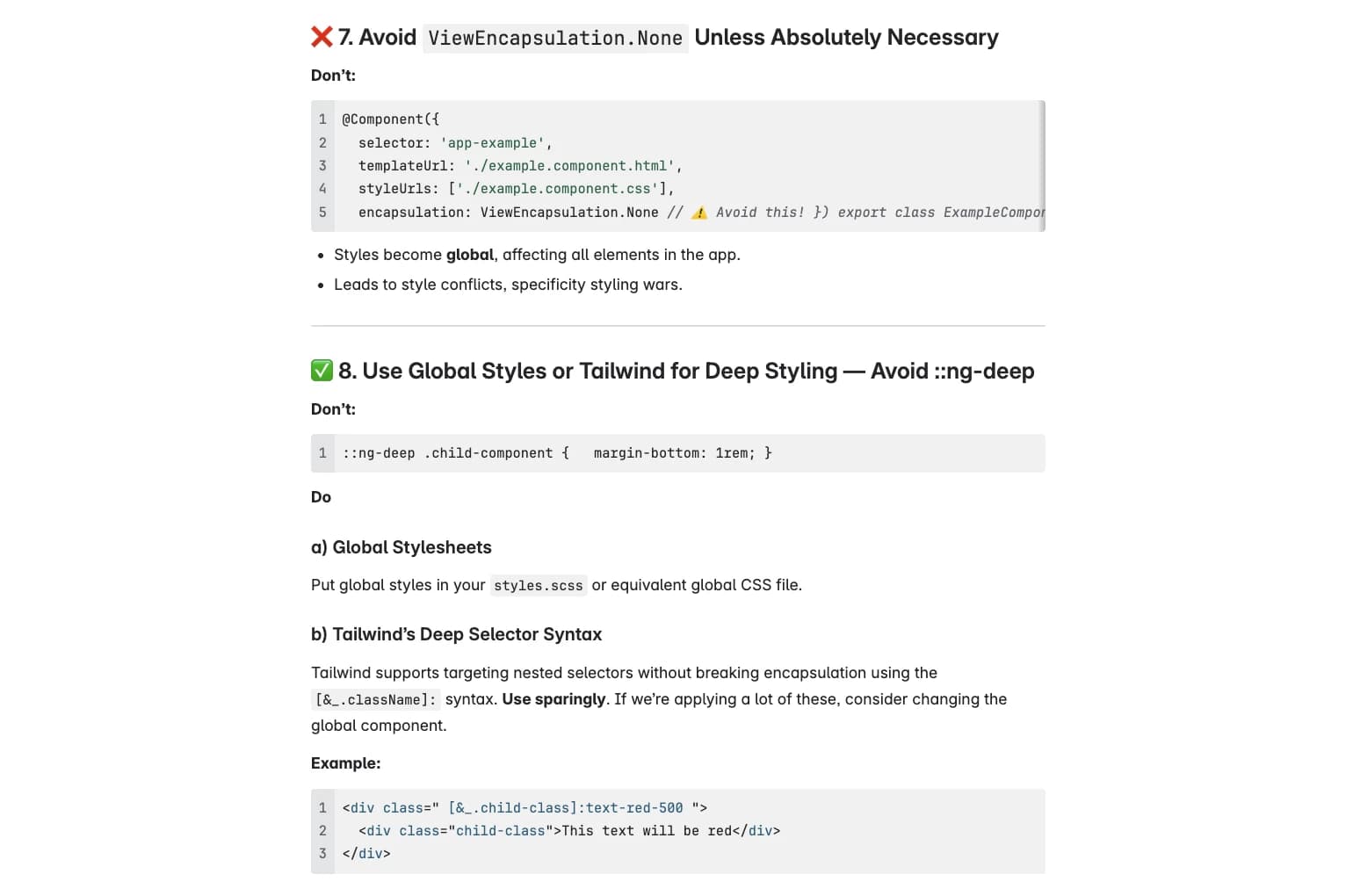
From the styling guide for engineers. Rules 7 and 8 cover two ways component styles leaked into the rest of the app.
What I'd do differently
Changing the load order broke styling across the app, and getting it stable again took about four months. It also delayed visible component work.
My approach was to change everything at once, let it break, and then go back and code each piece the way it should have been written in the first place.
Next time I'd phase it: isolate changes, and rely on scripts and trial runs. Back then, a script could take me a week to write and might not work. Scripts are easier to write now with AI.
2. Build a component once the pattern repeats
With the foundation stable, our other designer and I split the component design. I designed some and gave feedback on the rest. On the code side, I built the PrimeNG theme and every component, including the 10+ custom ones, and maintained the system from there.
- A pattern had to show up in 2 or 3 places before it became a shared component. If it hadn't repeated, it stayed local.
- A component's variants in Figma mapped to its inputs in code.
- 22+ components defined in Figma. 10+ built custom, and the rest were themed PrimeNG.
- Deprecated the old ones. PrimeNG's card and pill gave way to our own, and the 10–15 table versions became one.
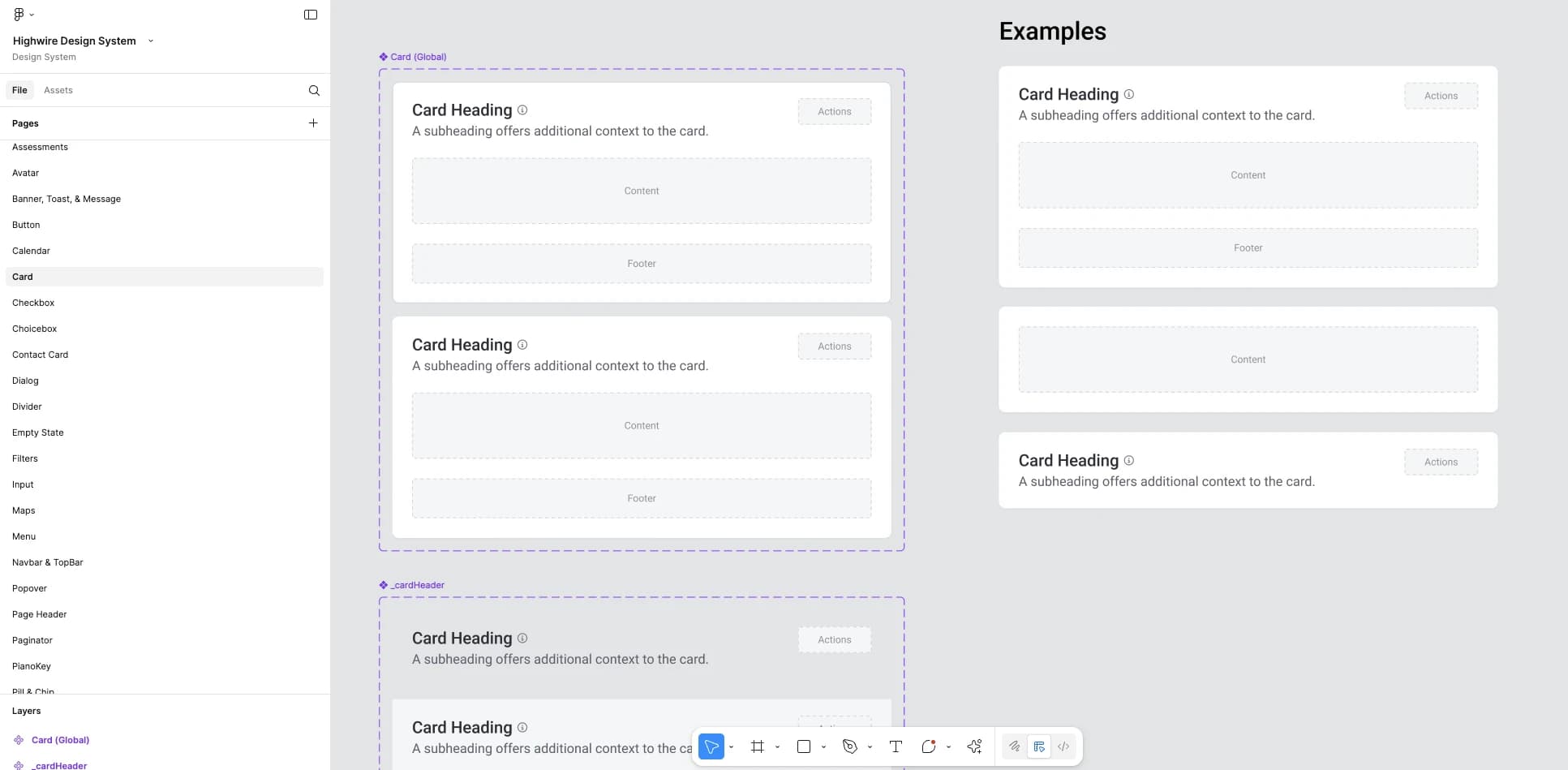
The Card in Figma. Heading, actions, content, and footer turn on and off, as in the examples on the right.
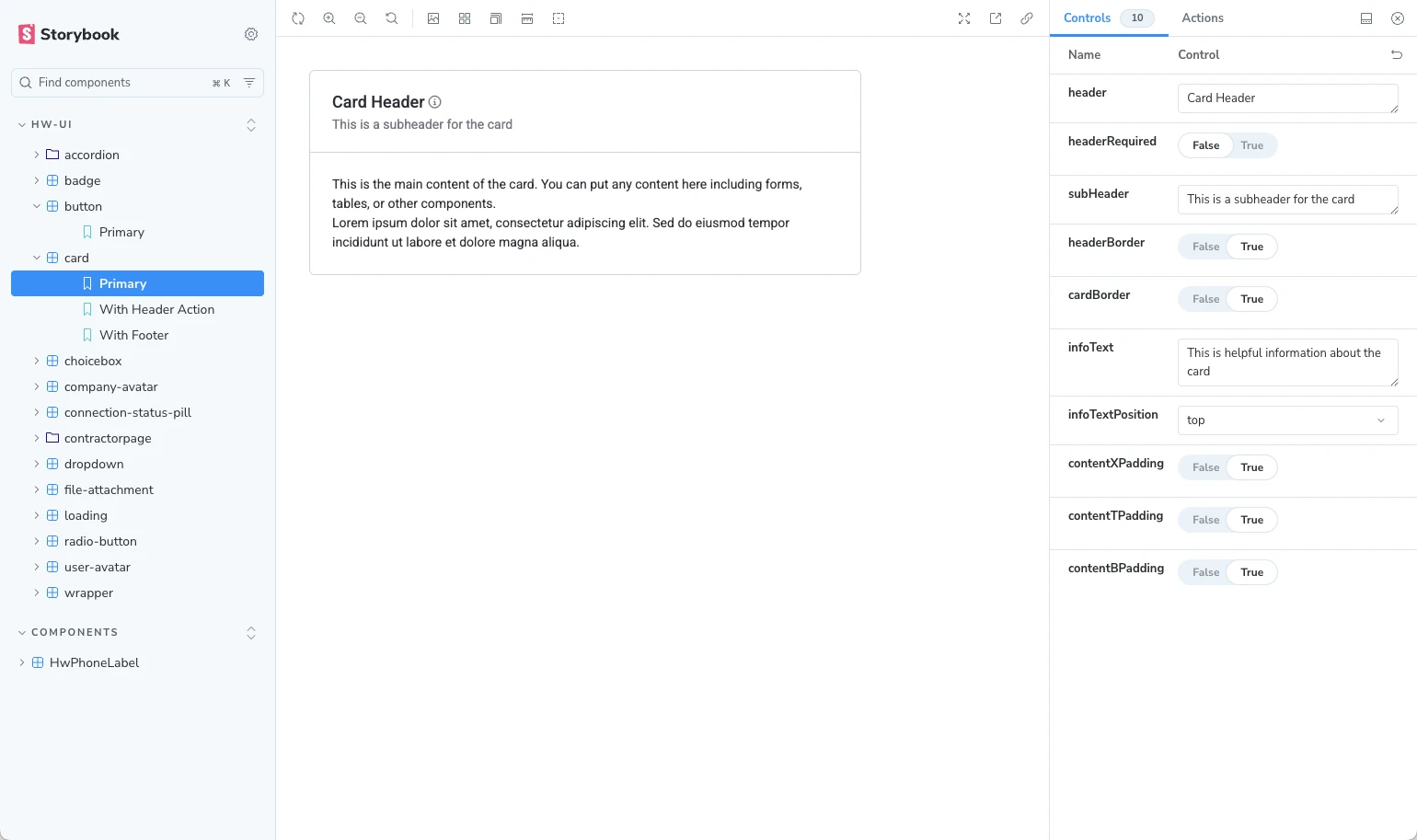
The same card in Storybook. The With Header Action and With Footer stories match the slots in Figma.
A walkthrough of one component and its variants in Figma.
3. Lint rules point engineers to the system
Storybook became the place to check what already existed, so engineers had less reason to rebuild things. To catch the rest, I wrote lint rules that warn engineers when they use something the system replaces:
- Use the Highwire button component in place of PrimeNG's
p-button. - Use
hw-chipin place of the older chip versions (v2 and v3). - Don't set props on PrimeNG components when the default already does the job.
I also demoed the system at engineering meetings, wrote short usage docs, and stayed in PR reviews and design QA to catch misuse before it shipped.
Results: One system across three apps
The system was rolled out across the SaaS platform, the contractor network site, and the reporting app, and the 10–15 table versions became one shared table.
Storybook use was uneven. Some engineers used it daily and some didn't.
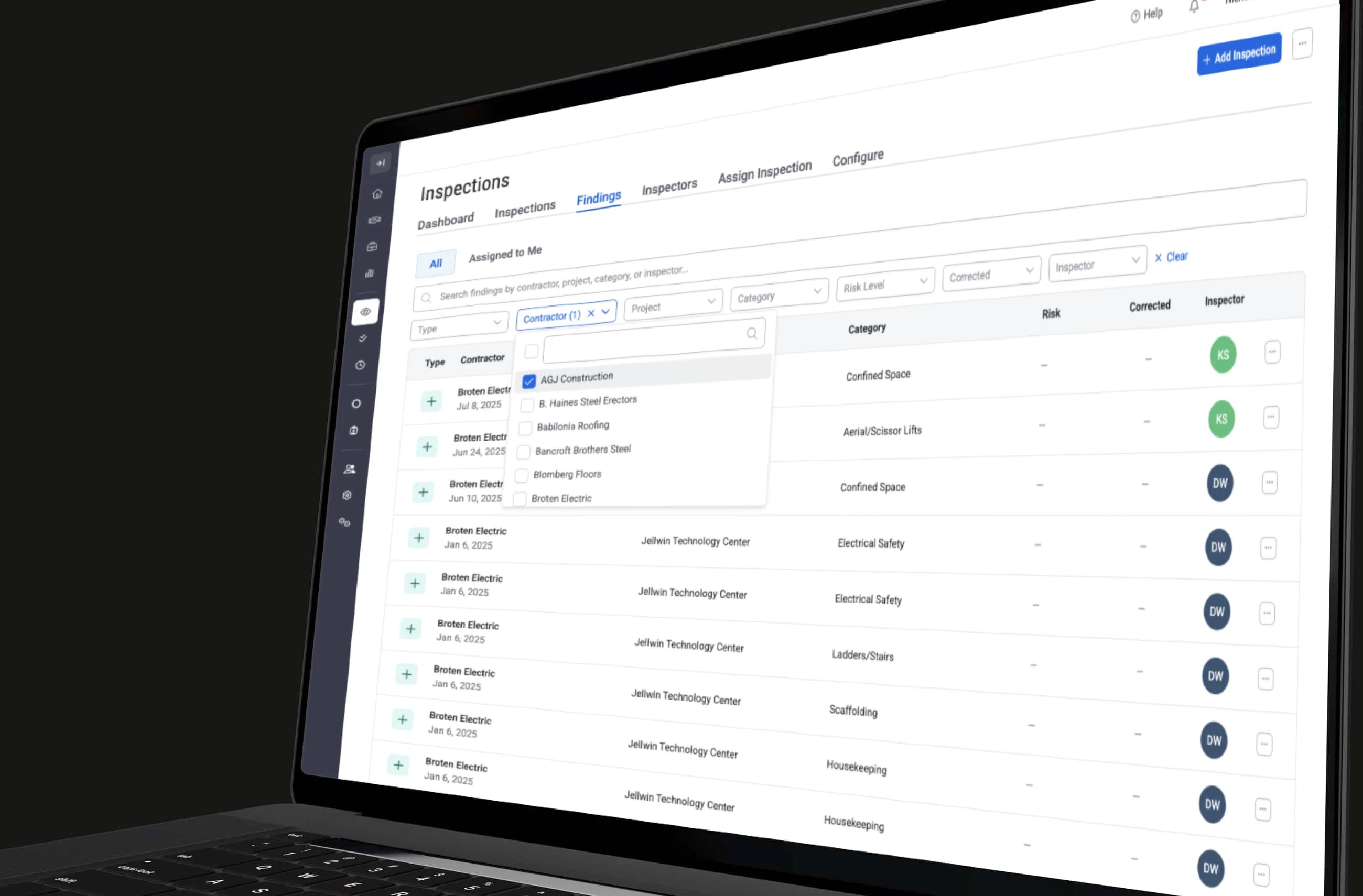
The shared table on the Findings page, with search, filters, and All and Assigned to Me tabs. It replaced 10–15 one-off tables.
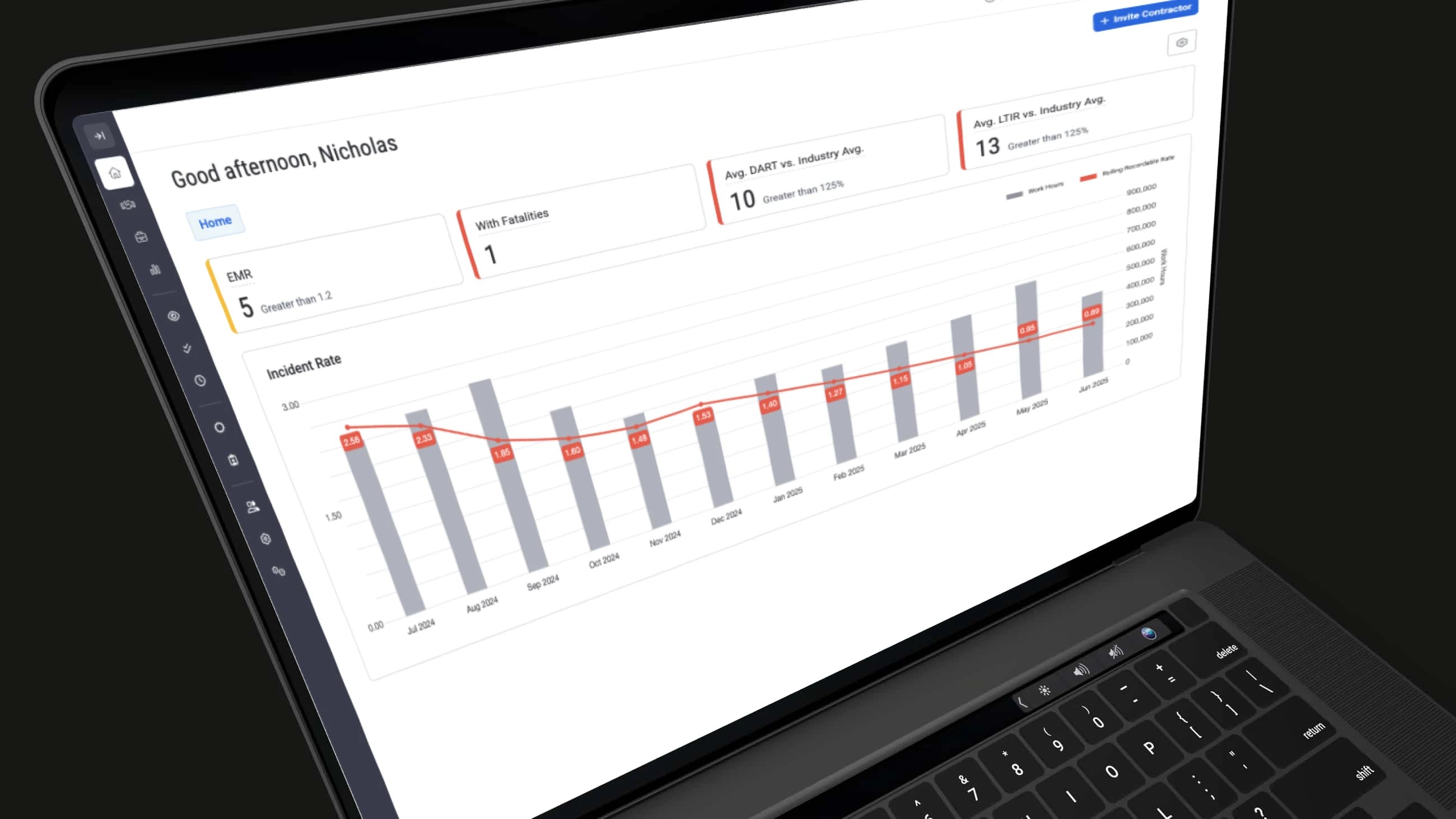
The client dashboard, built from the shared stat cards and chart.
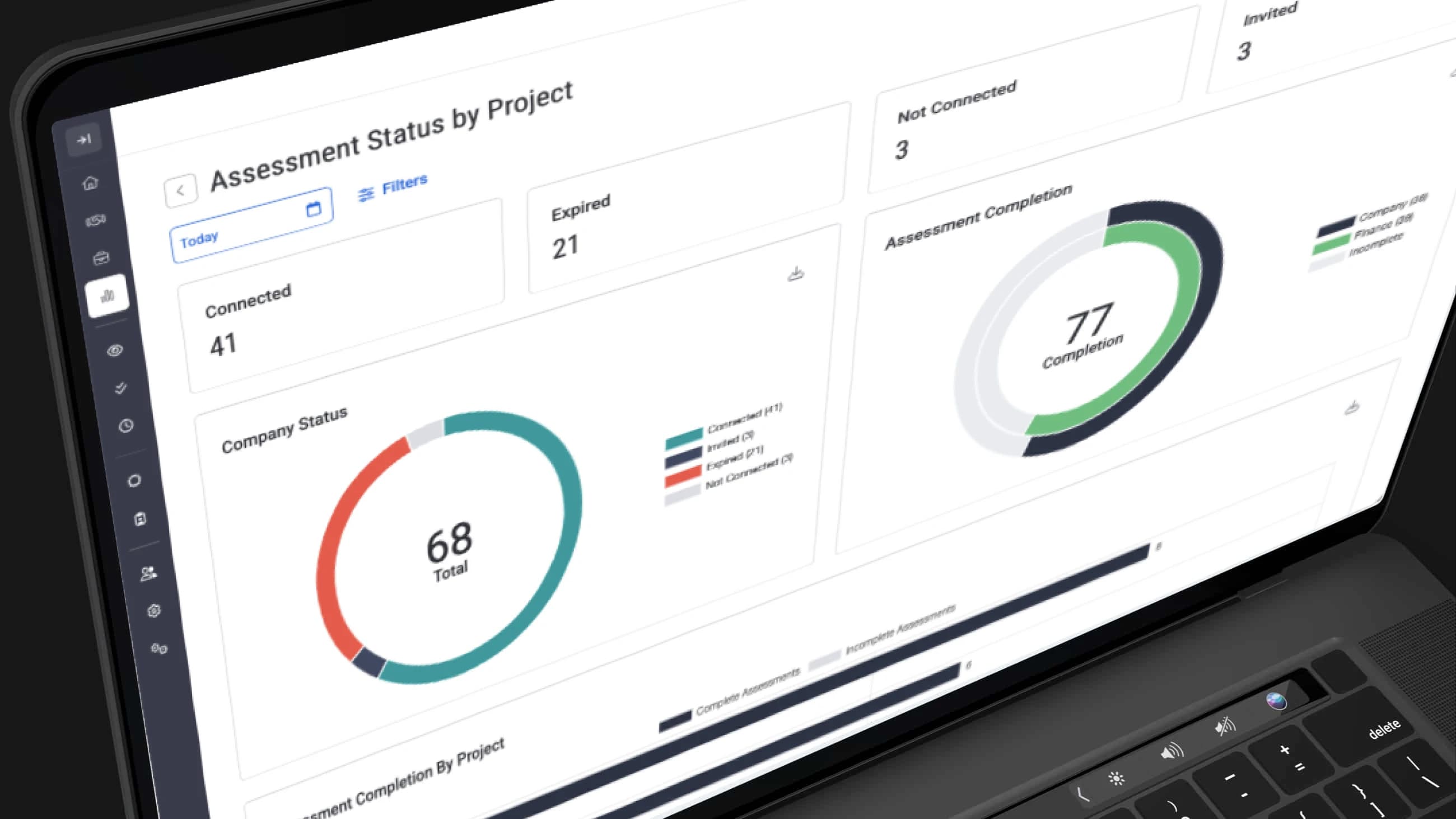
The Assessment Status by Project report uses the same stat cards, with donut charts below.
Takeaways
- Fix the foundation before the components. On top of conflicting styles, a new library becomes one more layer.
- Keep only the options you use. PrimeNG is built for every kind of product, and each extra option was another way for screens to drift apart.
- Put the rules where engineers already work. Lint warnings and PR reviews reached engineers while they were writing code.